This written version of the video tutorial was generated by an LLM from the video transcript, and supervised by me, Alejandro.
In this video, we take a deep dive into Kimi K2.6, the latest open-source foundation model from Moonshot AI. We explore how it stacks up against GPT-5.4 and Claude Opus 4.6, walk through key benchmarks, and demonstrate how to run it using OpenCode with Hugging Face Inference Providers. To test its real-world coding abilities, we have Kimi redesign an entire Hugo blog from scratch — preserving functionality while applying a modern, minimalist design.
What is Kimi K2.6?
Kimi K2.6 is the equivalent of GPT-5.4 or Claude Opus 4.6 — it’s the model or the brain behind your agent, such as Claude, ChatGPT, etc. When ChatGPT releases a new GPT-5 or GPT-6, something like that, this is similar but on the Kimi side.
Kimi is the family of models developed by the Moonshot AI company, and it seems to be faring very well in the benchmarks. You can go to kimi.com and use it just like ChatGPT or Claude — a direct alternative with competitive pricing (premium is $19/month).
Benchmark Highlights
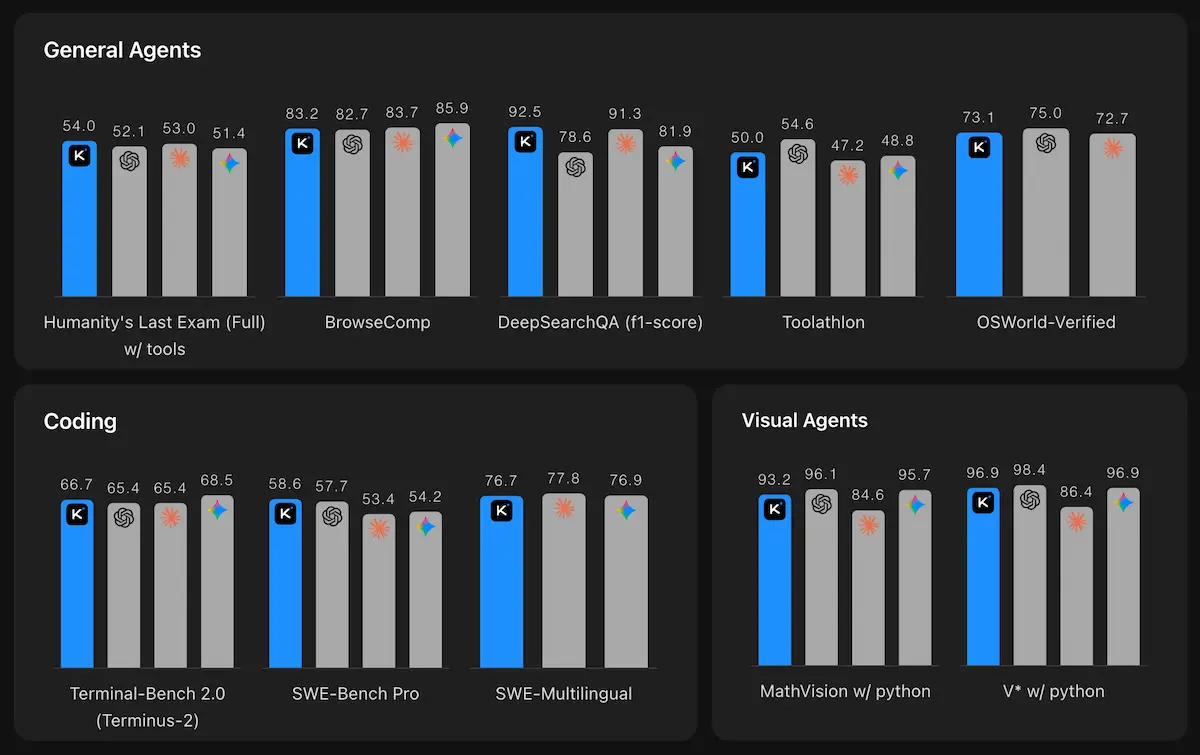
Benchmarks are a way to compare how good a model is compared to other models. We have the model complete a set of tasks, and we measure how many of those tasks the models completed successfully.
HLE-Full w/ tools (Humanity’s Last Exam): This is a generalist benchmark with questions created by absolute experts in their fields — linguistics, chemistry, physics, trivia, ecology, classics, etc. These are very difficult questions that only experts can solve.
- Kimi K2.6: 54.0
- GPT-5.4: 52.1
- Claude Opus 4.6: 53.0
Kimi is beating both GPT-5 and Claude Opus 4 on this benchmark, which is huge since these are currently the best generalist models.
Terminal-Bench 2.0 (Coding): A set of complicated coding problems involving reasoning across multiple files, editing multiple files to solve bugs or implement features.
- Kimi K2.6: 66.7
- GPT-5.4: 65.4
- Claude Opus 4.6: 65.4
SWE-Bench Pro (Coding, Python-only):
- Kimi K2.6: 58.6 (beats every other model)
- GPT-5.4: 57.7
- Claude Opus 4.6: 53.4
SWE-Bench Multilingual (Coding, multiple languages):
- Kimi K2.6: 76.7
- Claude Opus 4.6: 77.8
K2.6 is particularly strong on coding and agentic tasks, often matching or beating closed-source competitors at a lower cost.
Setting Up Kimi K2.6
Option A: Hugging Face Inference Providers (Recommended)
This is the most cost-effective way to use Kimi K2.6 — you pay per request (~$0.95/million tokens input, $4/million tokens output).
- Get a Hugging Face token at huggingface.co/settings/tokens
- Install the OpenAI SDK:
pip install --upgrade 'openai>=1.0'
- Initialize the client via Hugging Face:
import os
from getpass import getpass
from openai import OpenAI

if \"HF_TOKEN\" not in os.environ:
    os.environ[\"HF_TOKEN\"] = getpass(\"Enter your Hugging Face token: \")

client = OpenAI(
    api_key=os.environ.get(\"HF_TOKEN\"),
    base_url=\"https://router.huggingface.co/novita/v1\",
)

MODEL = \"moonshotai/Kimi-K2-6\"
Option B: Moonshot AI Direct
If you prefer the official Moonshot API:
- Go to platform.kimi.ai/console/api-keys
- Create a new API key
- Use this configuration:
client = OpenAI(
    api_key=os.environ.get(\"MOONSHOT_API_KEY\"),
    base_url=\"https://api.moonshot.ai/v1\",
)

MODEL = \"kimi-k2.6\"
Using OpenCode with Kimi
OpenCode is an alternative to Claude Code or Codex that allows you to connect to any open model. Here’s how to set it up:
- Install OpenCode in your terminal
- Connect to Hugging Face:
- Run
/provider connect provider - Search for Hugging Face
- Paste your HF API token
- Run
- Select Kimi K2.6:
- Run
/models - Find Hugging Face section
- Select
moonshotai/Kimi-K2-6
- Run
That’s it — you now have Kimi K2.6 running in your coding assistant.
Live Demo: Redesigning a Hugo Blog
We tested Kimi’s coding abilities by having it redesign a Hugo blog from scratch. The prompt:
Redesign this Hugo website by creating a new theme that is minimalist and which includes the same content and pages as the current one, but with a more modern design, yet minimalist. Use sans-serif fonts, clear background with dark text, and keep the functionalities such as Buy Me A Coffee, Google Analytics, etc.
Results:
- Total cost: $1.50 for the entire redesign
- Tokens used: ~130,000 (50% of context window)
- Time: Completed autonomously in one session
The redesign preserved all functionalities (dark/light mode, blog posts, tutorials, about page, resume, etc.) while applying a modern minimalist design. The table of contents moved smoothly as you scrolled — a nice touch.
This demonstrates K2.6’s ability to handle long-horizon tasks with complex requirements, maintaining functionality while changing design.
Pricing Comparison
Kimi K2.6 via Hugging Face:
- Input: $0.95/million tokens
- Output: $4/million tokens
Compare to OpenAI GPT-5.4:
- Input: $2.50/million tokens
- Output: $15/million tokens
For the entire blog redesign, we spent $1.50. Running the same task with GPT-5.4 would have cost significantly more. If you’re using models for specific tasks rather than all day, every day, open models are a very cost-effective alternative.
Multimodal Capabilities
K2.6 supports native multimodal understanding: text, images, and video.
Supported formats:
- Images: png, jpeg, webp, gif (up to 4K / 4096×2160)
- Videos: mp4, mpeg, mov, avi, x-flv, mpg, webm, wmv, 3gpp (up to 2K / 2048×1080)
Image understanding:
import base64

with open(\"sample_image.png\", \"rb\") as f:
    image_data = f.read()

image_url = f\"data:image/png;base64,{base64.b64encode(image_data).decode('utf-8')}\"

completion = client.chat.completions.create(
    model=MODEL,
    messages=[
        {\"role\": \"system\", \"content\": \"You are Kimi.\"},
        {
            \"role\": \"user\",
            \"content\": [
                {\"type\": \"image_url\", \"image_url\": {\"url\": image_url}},
                {\"type\": \"text\", \"text\": \"Please describe the content of the image.\"},
            ],
        },
    ],
)

print(completion.choices[0].message.content)
Video understanding:
with open(\"sample_video.mp4\", \"rb\") as f:
    video_data = f.read()

video_url = f\"data:video/mp4;base64,{base64.b64encode(video_data).decode('utf-8')}\"

completion = client.chat.completions.create(
    model=MODEL,
    messages=[
        {\"role\": \"system\", \"content\": \"You are Kimi.\"},
        {
            \"role\": \"user\",
            \"content\": [
                {\"type\": \"video_url\", \"video_url\": {\"url\": video_url}},
                {\"type\": \"text\", \"text\": \"Please describe what happens in this video.\"},
            ],
        },
    ],
    stream=True,
)
Thinking Mode & Parameters
K2.6 supports a thinking mode (enabled by default) that provides chain-of-thought reasoning. You can disable it for faster, cheaper responses on simple tasks:
response = client.chat.completions.create(
    model=MODEL,
    messages=[{\"role\": \"user\", \"content\": \"hello\"}],
    extra_body={\"thinking\": {\"type\": \"disabled\"}},
    max_tokens=1024*32
)
Key parameter differences:
| Parameter | Default | Notes |
|---|---|---|
thinking | {\"type\": \"enabled\"} | Disable with {\"type\": \"disabled\"} |
temperature | 1.0 (thinking) / 0.6 (non-thinking) | Fixed values |
top_p | 0.95 | Fixed value |
max_tokens | 32768 | Optional |
When to Choose Kimi K2.6
Strengths:
- Coding: Best-in-class open-source performance on SWE-Bench, Terminal-Bench
- Agentic workflows: Long-horizon reliability, tool calling accuracy
- Multimodal: Native video understanding + vision reasoning
- Cost: Strong performance at lower price points
- Compatibility: OpenAI API format means zero-friction migration
Trade-offs:
- Pure reasoning: GPT-5.4 and Gemini 3.1 Pro still lead on some math/reasoning benchmarks
- Ecosystem: Smaller community than OpenAI/Anthropic