Most coding model benchmarks ask one broad question: which model is best?
That is useful, but it is not how I actually use coding agents. In practice, I often split the workflow into two roles:
- a planner, which reads the issue and decides what should change
- an implementer, which takes that plan and makes the code change
That split raises a more practical question: which planner and implementer pair gives you the best code for the money?.
That is what DuoBench is for. It is a small benchmark harness in the form of a Skill. It is used for running planner-to-implementer combinations on real GitHub issues. It collects the resulting commits, scores them with an LLM judge panel, and compares quality against token cost.
The Benchmark Task
For this run, I used CPython issue #150700, a bug opened on June 1, 2026 and fixed on June 9, 2026.
The model being tested has to inspect a large real-world C codebase, understand a compiler edge case, make a restrained patch, and add the right tests.
The issue is also recent. That matters because older public issues are more likely to appear in model training data.
How DuoBench Works
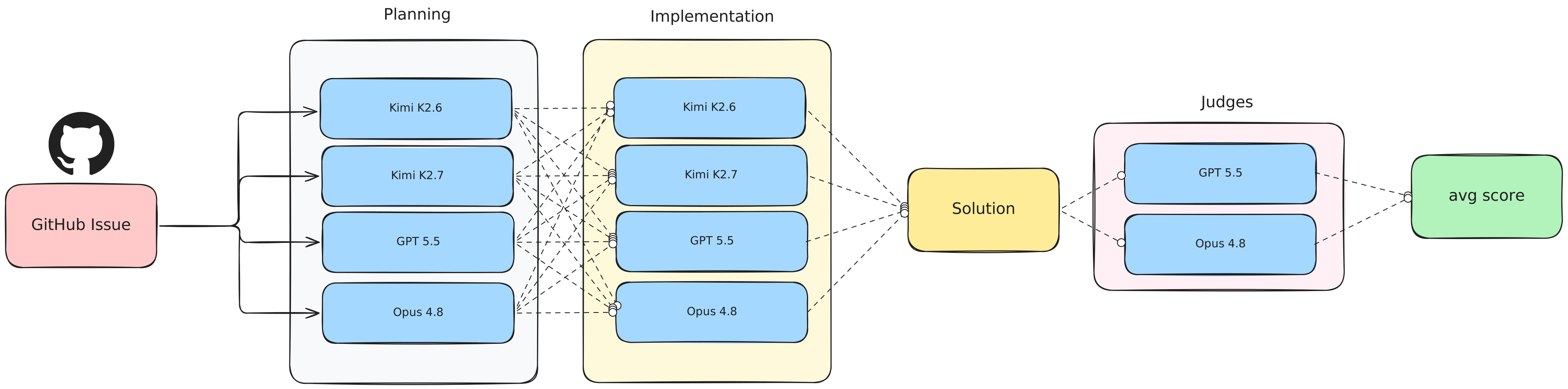
I asked my agent to benchmark the following models and all their combinations:
- Kimi K2.7
- Kimi K2.6
- GPT-5.5
- Claude Opus 4.8
Every condition follows the same pipeline.
First, the planner reads the issue and explores the repository. It writes a handoff plan, but it does not edit code.
Then, the implementer receives that plan and produces exactly one local commit.
Finally, a judge panel scores the commit across task completion, correctness, code quality, and verification. In this run, the panel used GPT-5.5 and Claude Opus 4.8, and I averaged their scores.
The output is a nice set of plots, a leaderboard, the task code solution of each pair, and the raw data: scores and cost.
The Result
The most interesting result was not simply which model scored highest. It was the relationship between quality and cost.
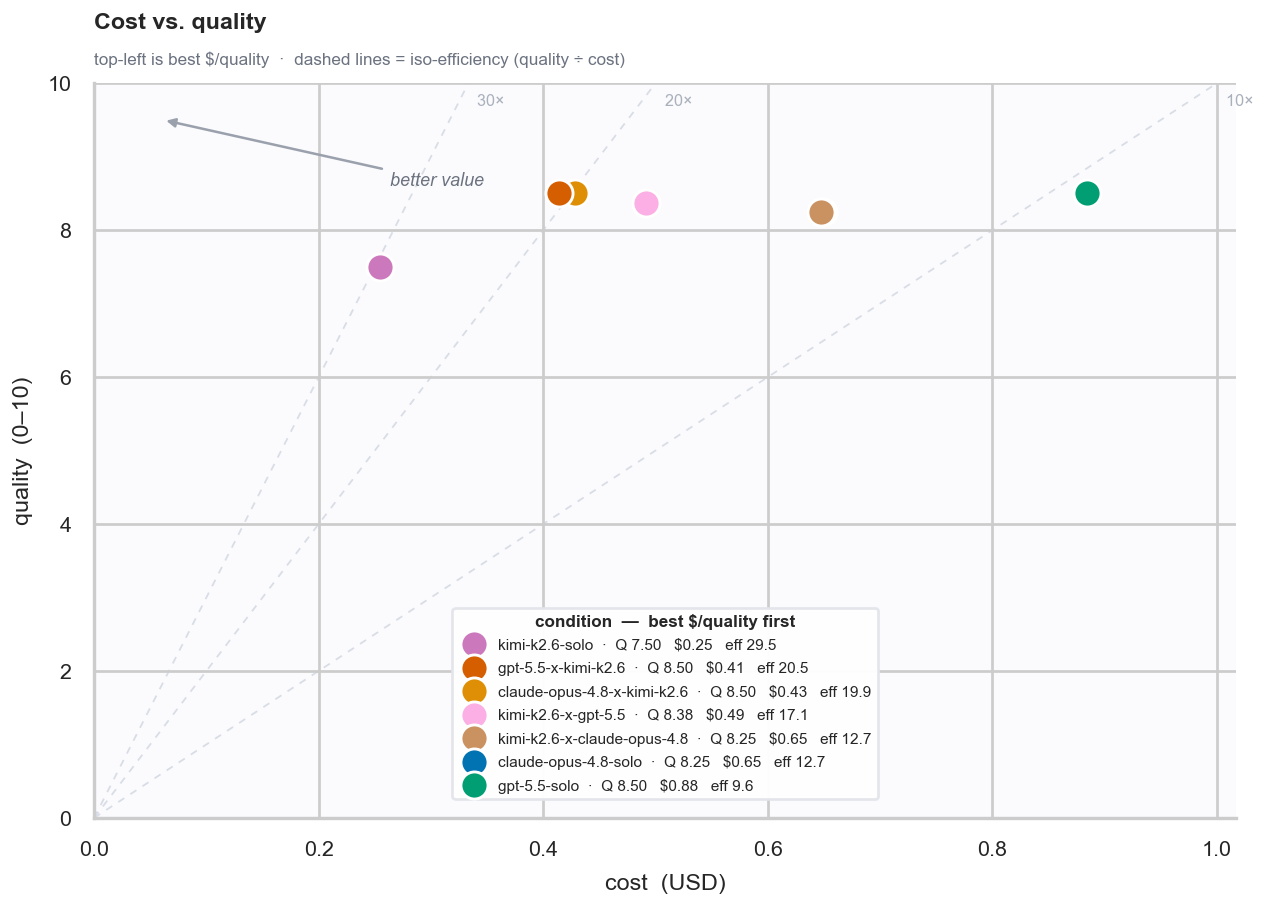
Kimi K2.7 solo sits in the best part of the chart: high quality and low cost. The Kimi implementer runs cluster near the efficient side of the frontier, while Opus-heavy runs are more expensive without a clear quality advantage on this issue.
That does not mean Opus is bad. It means that, for this specific CPython issue, paying for Opus as the implementer did not buy enough extra quality to justify the cost.
The broader pattern is also important: Kimi was strongest as the implementer. The top conditions mostly use Kimi K2.6 or Kimi K2.7 to make the final code change.
That makes sense: using the latest closed SOTA models as architects and Kimi K2.7 as the implementer/engineer gives the best results.
Where the Money Goes
The cost breakdown shows why the implementer matters so much.
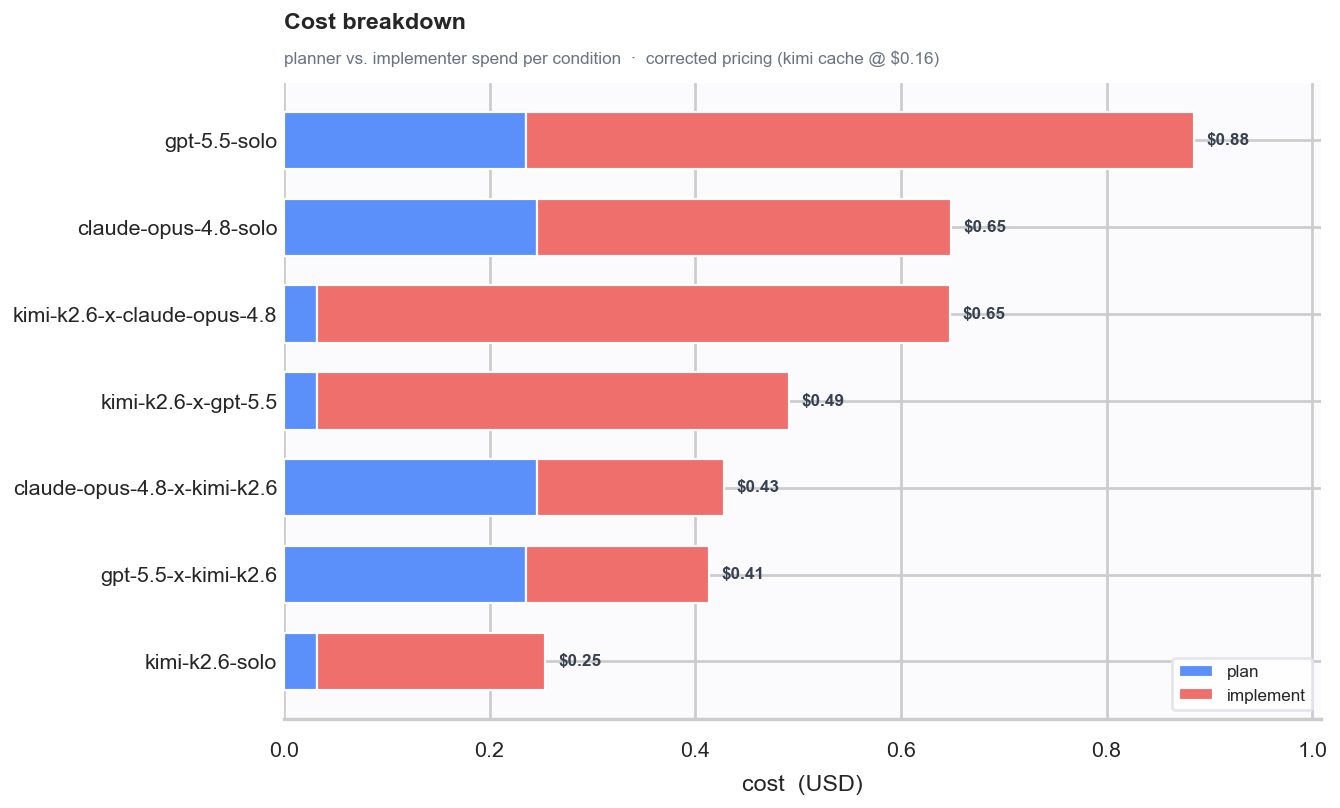
Planning is relatively cheap. Implementation is where the bill grows.
That is the central reason DuoBench tests pairings instead of only solo models. A strong expensive planner paired with a cheaper implementer can make sense. But if the cheaper model is also a strong solo implementer, the best answer may be simpler: use it directly.
In this run, Kimi K2.7 solo was exactly that kind of result.
What Kimi K2.7 Changed
Kimi K2.7 is the new model in this comparison. It is available through Moonshot AI’s Kimi release and on Hugging Face.
Compared with Kimi K2.6 in this run, Kimi K2.7 improved the solo score from 8.62 to 9.00 while lowering the cost slightly. As an implementer paired with Opus planning, it also scored higher than the K2.6 implementer condition.
That does not prove K2.7 is universally better. This is one issue, one trial per condition, and an LLM-judged score. But it is a useful signal: K2.7 is worth testing as a coding implementer in your own repos.
Judge Bias
LLM judges have opinions too.
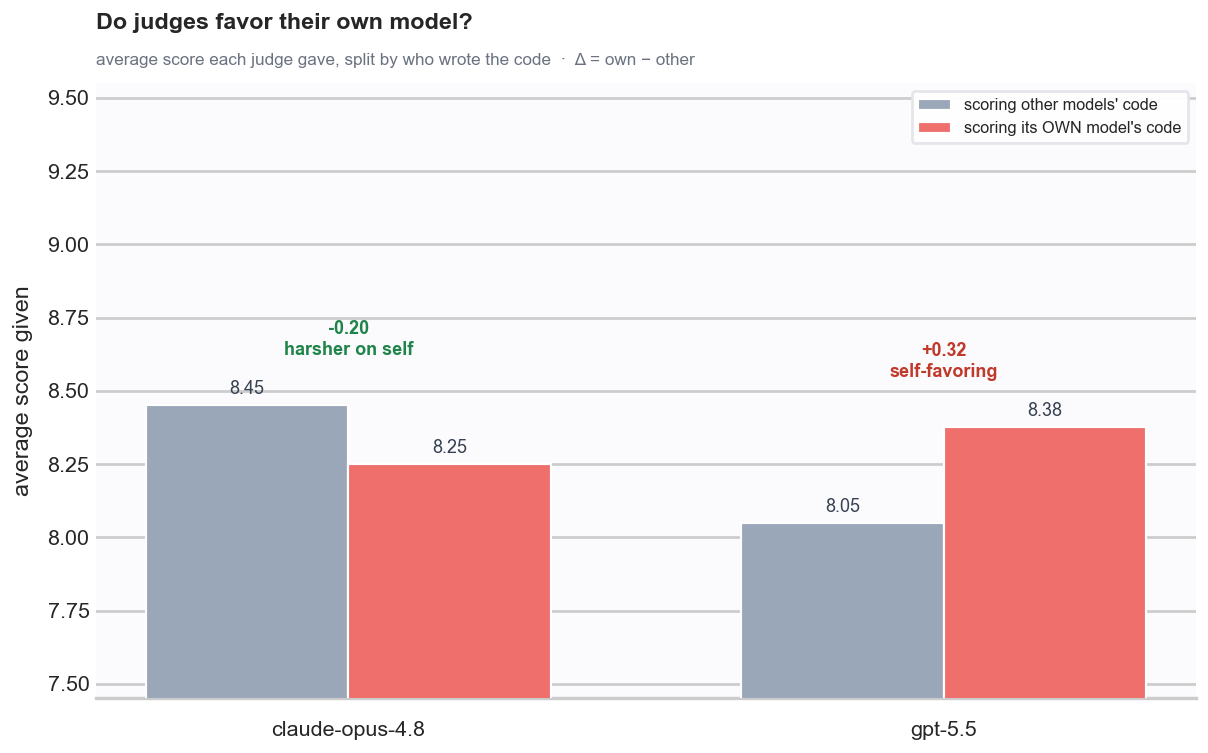
In this run, the self-bias was mild. GPT-5.5 and Claude Opus 4.8 each had small preferences in some places, but averaging both judges helped smooth out the effect.
I still would not treat the judge score as ground truth. The judge panel is a triage tool. The final decision should come from reading the patch, running the tests, and deciding whether the solution is actually acceptable.
How I Would Use This
I would not run DuoBench once and declare a universal winner. This is not a scientific report. This is a demo of a tool that you can use to pick the best model pairings for your use cases.
For this to be a scientific report, we would have to run this multiple times per issue over dozens of code problems. That was not the goal here.
The goal was to show you that you can use open source models to improve your quality-to-cost ratio.
I believe we met that goal. I hope this gets you to use open source models in your workflows.