

Welcome to a beginner-friendly tutorial on building a multi-agent deep research pipeline that uses the following components:
- Smolagents: A minimalist, very powerful agent library that allows you to create and run multi-agent systems with a few lines of code.
- Firecrawl: A robust search-and-scrape engine for LLMs to crawl, index, and extract web content.
- Open models from Hugging Face to scrape and research the web.
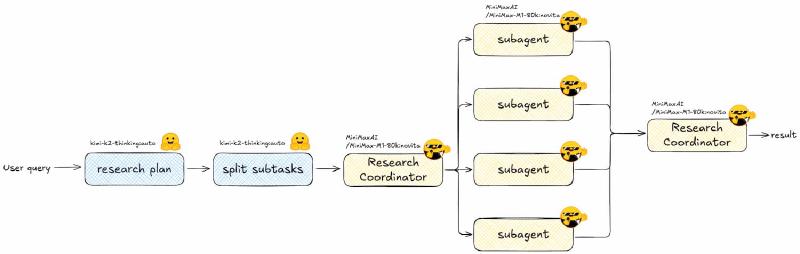
We will be creating a multi-agent system that is coordinated by a “Coordinator Agent” that spawns multiple “Sub-Agent” instances to handle different subtasks.
We’ll build a streamlined take on Anthropic’s Deep Research agent. Their post How we built our multi-agent research system was the inspiration for this tutorial. All code for this walkthrough lives in the companion repo.
You don’t need any previous experience with smolagents, Firecrawl, or open models. This tutorial is designed to be beginner-friendly, with clear explanations and code examples. All you need to know is how an agent works in principle (calling tools in a loop). Let’s get started!
What We’re Building#
- You type a question in the CLI.
- A planner LLM drafts a thorough research map.
- A splitter LLM turns that map into bite‑sized, non‑overlapping subtasks (JSON).
- A coordinator agent spins up one sub-agent per subtask; every sub-agent can search & scrape the web through Firecrawl’s MCP toolkit.
- The coordinator stitches every mini-report into one polished markdown file:
research_result.md.
Everything below points to code in this repo so you can connect the dots as you read.
Quick Setup#
Collab Notebook#
If you are in a Google Colab, you can install all the dependencies by running the following cell:
!pip install 'smolagents[mcp]' firecrawl huggingface_hub
And then set up your environment variables:
import os

os.environ["HF_TOKEN"] = "your_hf_token"
os.environ["FIRECRAWL_API_KEY"] = "your_firecrawl_api_key"
Local Installation#
If you are running this locally, I recommend that you use uv to install the dependencies. You can install it by running the instructions here.
Once it’s installed, you can start a new project by running the following command:
uv init open-deep-research-w-firecrawl
And then install the dependencies:
uv add 'smolagents[mcp]' firecrawl huggingface_hub
Don’t forget to set up your environment variables in your .env file:
HF_TOKEN=your_hf_token
FIRECRAWL_API_KEY=your_firecrawl_api_key
Step 1: Draft a Research Plan#
All good research starts with a well-structured plan. That’s what the first step of the pipeline will do. The planner LLM will take the user query and draft a thorough research map.
We will do that by calling the planner LLM with the following prompt:
PLANNER_SYSTEM_INSTRUCTIONS = """
You will be given a research task by a user. Your job is to produce a set of
instructions for a researcher that will complete the task. Do NOT complete the
task yourself, just provide instructions on how to complete it.

GUIDELINES:
1. Maximize specificity and detail. Include all known user preferences and
   explicitly list key attributes or dimensions to consider.
2. If essential attributes are missing, explicitly state that they are open-ended.
3. Avoid unwarranted assumptions. Treat unspecified dimensions as flexible.
4. Use the first person (from the user's perspective).
5. When helpful, explicitly ask the researcher to include tables.
6. Include the expected output format (e.g. structured report with headers).
7. Preserve the input language unless the user explicitly asks otherwise.
8. Sources: prefer primary / official / original sources.
"""
And here is the LLM call. We will be using Hugging Face’s Inference Providers to call the planner LLM (for more info on what are Inference Providers, feel free to check out this video). Inference Providers allows you to call open source LLMs with a few lines of code. The model we will be using is moonshotai/Kimi-K2-Thinking, which is a powerful open model from Moonshot AI.
In this example, the planner LLM streams tokens, so you watch it think. But that is not necessary. You can just remove the stream=True flag and return the full completion if you want.
Also, feel free to check the prompts.py file to see the system instructions for the planner.
# planner.py
from huggingface_hub import InferenceClient
from prompts import PLANNER_SYSTEM_INSTRUCTIONS

def generate_research_plan(user_query: str) -> str:
    MODEL_ID = "moonshotai/Kimi-K2-Thinking"
    PROVIDER = "auto"

    planner_client = InferenceClient(
        api_key=os.environ["HF_TOKEN"],
        bill_to="huggingface",
        provider=PROVIDER,
    )

    return planner_client.chat.completions.create(
        model=MODEL_ID,
        messages=[
            {"role": "system", "content": PLANNER_SYSTEM_INSTRUCTIONS},
            {"role": "user", "content": user_query},
        ],
        stream=True,
    )
Step 2: Split the Plan into Focused Subtasks#
Now we ask another model to turn that plan into structured JSON. Pydantic provides the schema, and you can use the parameter response_format to make the LLM obey it. Here is more info on how to use Structured Outputs with Hugging Face’s Inference Providers.
We will need to define the prompt template for the task splitter LLM. Here is the template:
TASK_SPLITTER_SYSTEM_INSTRUCTIONS = """
You will be given a set of research instructions (a research plan).
Your job is to break this plan into a set of coherent, non-overlapping
subtasks that can be researched independently by separate agents.

Requirements:
- 3 to 8 subtasks is usually a good range. Use your judgment.
- Each subtask should have:
  - an 'id' (short string),
  - a 'title' (short descriptive title),
  - a 'description' (clear, detailed instructions for the sub-agent).
- Subtasks should collectively cover the full scope of the original plan
  without unnecessary duplication.
- Prefer grouping by dimensions: time periods, regions, actors, themes,
  causal mechanisms, etc., depending on the topic.
- Each description should be very clear and detailed about everything that
  the agent needs to research to cover that topic.
- Do not include a final task that will put everything together.
  This will be done later in another step.

Output format:
Return ONLY valid JSON with this schema:

{
  "subtasks": [
    {
      "id": "string",
      "title": "string",
      "description": "string"
    }
  ]
}
"""
Now let’s create the actual task splitter LLM call. In this example, I omit the Field descriptions for conciseness. It is a good practice to include them in your agent code to make the JSON schema self-documenting. The agent also sees the descriptions when it is reasoning about the subtasks.
# task_splitter.py (core bits)
class Subtask(BaseModel):
    id: str
    title: str
    description: str

class SubtaskList(BaseModel):
    subtasks: List[Subtask]

TASK_SPLITTER_JSON_SCHEMA = {
    "name": "subtaskList",
    "schema": SubtaskList.model_json_schema(),
    "strict": True,
}

completion = client.chat.completions.create(
    model=MODEL_ID,
    messages=[
        {"role": "system", "content": TASK_SPLITTER_SYSTEM_INSTRUCTIONS},
        {"role": "user", "content": research_plan},
    ],
    response_format={
        "type": "json_schema",
        "json_schema": TASK_SPLITTER_JSON_SCHEMA,
    }
)

subtasks = json.loads(completion.choices[0].message.content)["subtasks"]
By the end of this step, you will have a list of non-overlapping subtasks that cover the research plan.
Step 3: Coordinator + Sub-Agents Share Firecrawl Tools#
Here’s where it gets fun. We will create our subagents and give them tools that they can use to search the web and scrape pages.
Since each sub-agent will perform thorough research on its subtask, we need to give them a clear instruction on what to do. We will use the SUBAGENT_PROMPT_TEMPLATE to inject the subtask details into the sub-agent’s prompt. Here is the template:
SUBAGENT_PROMPT_TEMPLATE = """
You are a specialized research sub-agent.

Global user query:
{user_query}

Overall research plan:
{research_plan}

Your specific subtask (ID: {subtask_id}, Title: {subtask_title}) is:

\"\"\"{subtask_description}\"\"\"

Instructions:
- Focus ONLY on this subtask, but keep the global query in mind for context.
- Use the available tools to search for up-to-date, high-quality sources.
- Prioritize primary and official sources when possible.
- Be explicit about uncertainties, disagreements in the literature, and gaps.
- Return your results as a MARKDOWN report with this structure:

# [Subtask ID] [Subtask Title]

## Summary
Short overview of the main findings.

## Detailed Analysis
Well-structured explanation with subsections as needed.

## Key Points
- Bullet point
- Bullet point

## Sources
- [Title](url) - short comment on why this source is relevant

Now perform the research and return ONLY the markdown report.
"""
We could then create our custom tools like this:
from smolagents import tool

@tool
def search(query: str) -> str:
    """Search the web for the given query."""
    ... # your search logic here
    return search_results

@tool
def scrape(url: str) -> str:
    """Scrape the given URL."""
    ... # your scraping logic here
    return scraped_content
But we will take this opportunity to learn to reuse existing tools so we don’t have to reinvent the wheel every time we have to create an agent tool. With the advent of the Model Context Protocol (MCP), many great engineering teams have started crafting agent tools for their services and publishing them as MCP servers.
Most agent frameworks (smolagents included) allow you to import tools from existing MCP servers.
Let’s first initialize the sub-agent model. Be sure to check the provider’s documentation to see if it supports tool usage. You can also refer to this list of providers and sort by “Tool Usage” to see which ones support tools.
subagent_model = InferenceClientModel(
    model_id="MiniMaxAI/MiniMax-M1-80k",
    provider="novita", # select one that supports tool usage
)
Now, let’s create a tool that initializes a sub-agent, which itself has access to the Firecrawl search and scrape tools.
# coordinator.py (core bits)
from smolagents import tool, MCPClient, InferenceClientModel

FIRECRAWL_API_KEY = os.environ["FIRECRAWL_API_KEY"]
MCP_URL = f"https://mcp.firecrawl.dev/{FIRECRAWL_API_KEY}/v2/mcp"

with MCPClient({"url": MCP_URL, "transport": "streamable-http"}) as mcp_tools:

    @tool
    def initialize_subagent(subtask_id: str, subtask_title: str, subtask_description: str) -> str:
        subagent = ToolCallingAgent(
            tools=mcp_tools,            # Firecrawl search/scrape
            model=subagent_model,
            add_base_tools=False,
            name=f"subagent_{subtask_id}",
        )

        subagent_prompt = SUBAGENT_PROMPT_TEMPLATE.format(
            user_query=user_query,
            research_plan=research_plan,
            subtask_id=subtask_id,
            subtask_title=subtask_title,
            subtask_description=subtask_description,
        )
        return subagent.run(subagent_prompt)
- Sub-agents all use the same prompt template from
prompts.py, so their reports share structure (summary, analysis, bullets, sources). - Models: coordinator and sub-agents default to
MiniMaxAI/MiniMax-M1-80kvia Novita. SwapCOORDINATOR_MODEL_ID/SUBAGENT_MODEL_IDto try other long-context models.
Coordinator Orchestration#
The coordinator’s only “tool” is the ability to spawn sub-agents. It loops through the JSON subtasks, calls the tool once per subtask, waits, then merges the incoming markdown. We will first initialize the coordinator model.
coordinator_model = InferenceClientModel(
    model_id="MiniMaxAI/MiniMax-M1-80k",
    provider="novita", # select one that supports tool usage
)
Let’s also give it this prompt template:
COORDINATOR_PROMPT_TEMPLATE = """
You are the LEAD RESEARCH COORDINATOR AGENT.

The user has asked:
\"\"\"{user_query}\"\"\"

A detailed research plan has already been created:

\"\"\"{research_plan}\"\"\"

This plan has been split into the following subtasks (JSON):

\`\`\`json
{subtasks_json}
\`\`\`
Each element has the shape:
{{
“id”: “timeframe_confirmation”,
“title”: “Confirm Research Scope Parameters”,
“description”: “Analyze the scope parameters…”
}}

You have access to a tool called:
• initialize_subagent(subtask_id: str, subtask_title: str, subtask_description: str)

Your job:
1. For EACH subtask in the JSON array, call initialize_subagent exactly once
with:
• subtask_id       = subtask[“id”]
• subtask_title    = subtask[“title”]
• subtask_description = subtask[“description”]
2. Wait for all sub-agent reports to come back. Each tool call returns a
markdown report for that subtask.
3. After you have results for ALL subtasks, synthesize them into a SINGLE,
coherent, deeply researched report addressing the original user query
("{user_query}").

Final report requirements:
• Integrate all sub-agent findings; avoid redundancy.
• Make the structure clear with headings and subheadings.
• Highlight:
• key drivers and mechanisms of insecurity,
• historical and temporal evolution,
• geographic and thematic patterns,
• state capacity, public perception, and socioeconomic correlates,
• open questions and uncertainties.
• Include final sections:
• Open Questions and Further Research
• Bibliography / Sources: merge and deduplicate the key sources from all sub-agents.

Important:
• DO NOT expose internal tool-call mechanics to the user.
• Your final answer to the user should be a polished markdown report.
"""
And finally, let’s initialize the coordinator agent and give it the initialize_subagent tool:
coordinator = ToolCallingAgent(
    tools=[initialize_subagent],
    model=coordinator_model,
    add_base_tools=False,
    name="coordinator_agent",
)

coordinator_prompt = COORDINATOR_PROMPT_TEMPLATE.format(
    user_query=user_query,
    research_plan=research_plan,
    subtasks_json=json.dumps(subtasks, indent=2, ensure_ascii=False),
)

final_report = coordinator.run(coordinator_prompt)
Let’s put the whole thing into a function:
def run_deep_research(user_query: str) -> str:
    research_plan = generate_research_plan(user_query)
    subtasks = split_into_subtasks(research_plan)

    # initialize the coordinator and sub-agents here

    return coordinator.run(coordinator_prompt)
Step 4: The Tiny CLI#
main.py is intentionally bare-bones: load env vars, ask for a question, run the pipeline, write research_result.md, and tell you where it went. That’s it.
def main():
    load_dotenv()
    user_query = input("Enter your research query: ")
    result = run_deep_research(user_query)
    with open("research_result.md", "w") as f:
        f.write(result)
    print("Research result saved to research_result.md")
Run the whole thing#
To run the pipeline, simply run:
uv run main.py
It will prompt you for a research query and start the pipeline.
Congrats! You now have a working deep-research system! 🥳
Possible Improvements#
This is, of course, a minimal implementation. You can extend it in many ways:
- Human-in-the-Loop: Add a step where the user reviews and approves the research plan.
- Error Handling: Add retry logic for sub-agent calls, handle timeouts, and log errors.
- Add Logging: Log important events like agent spawns, tool calls, and final report generation.
- Observability: Use a tool like OpenTelemetry or Langsmith to trace your agent performance and debug issues.
- Scalability: Add a queue for subtasks if you expect a lot of traffic.
- Parallelism: Run sub-agents in parallel if your model supports it.
- Caching: Cache Firecrawl results to avoid redundant searches.
Also, in this example, we created the subagents in the most simple way possible for clarity. But smolagents actually supports a managed_agents parameter when initializing an agent. We will use this in some future examples to manage the lifecycle of the sub-agents.
Great job. Keep it up!
References & Links#
- Firecrawl: A tool for scraping websites and converting them to markdown.
- smolagents: A library for building multi-agent systems.
- Hugging Face: A platform for sharing and using pre-trained models.
- Multi-Agent Research System: A blog post by Anthropic on building a multi-agent research system.